
Drone Screen Controllers in Kenya: What “RC 2 Included” Means
A controller with its own screen changes how you prepare and view the camera feed. It does not turn the controller into a general-purpose tablet or remove every reason to use a phone.
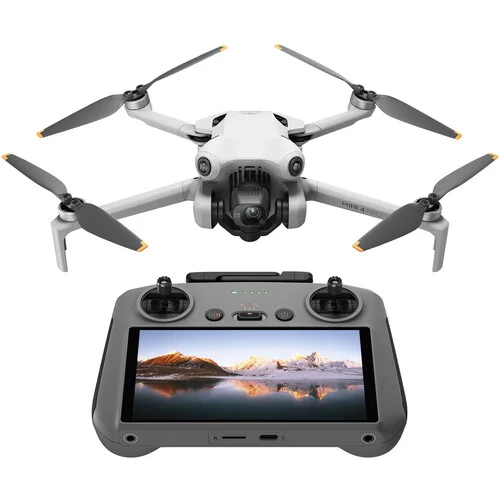
The controller can provide the viewing screen
With a phone-based controller, a compatible phone supplies the display and app. A screen-equipped controller provides a dedicated viewing and control device. That can simplify the equipment you arrange before filming, but you still need to identify the exact controller and compatible aircraft.
The Mini 4 Pro packages reviewed here include DJI RC 2, which has its own screen and DJI Fly installed. Your phone is therefore not needed as the controller’s viewing screen. DJI’s Mini 4 Pro FAQ explains the app and activation arrangements for this combination.
When comparing offers in Kenya, put the controller name next to the aircraft name in your notes. “With remote” is less useful than an exact model. Ask whether the supplied controller has its own screen, which app it uses and whether it is compatible with that aircraft before comparing the rest of the kit.
A dedicated screen still needs preparation
For first use with Mini 4 Pro, DJI instructs buyers to connect RC 2 to the internet through Wi-Fi or a phone hotspot and follow DJI Fly’s activation prompts. The aircraft is then activated through the app. Built-in display and internet setup are separate requirements.
Set aside time for the manufacturer’s setup process before an occasion when you expect to use the kit. Have the account access, network and charging equipment ready. If you use a mobile hotspot, check your own data allowance; do not assume that buying a screen controller includes a mobile-data service.
Also plan power for the controller itself. A charged aircraft battery does not show that the controller is ready. Follow the relevant charging instructions for each device and check their status separately when preparing your equipment.
A phone can still be useful after recording
The controller’s screen is not the same thing as a complete editing and publishing workflow. DJI’s RC 2 FAQ recommends using DJI Fly on a smartphone and connecting directly to the aircraft for QuickTransfer when managing and sharing footage.
Before buying, decide where the recorded files need to end up. If you edit on a phone, check its supported app and available space. If your work goes to a computer, plan the supported transfer route and storage there. A camera preview on the controller is not evidence that the finished files have already reached the device where you will edit them.
For a Kenyan property presenter or travel creator, this is often more useful than asking whether the system is completely “phone-free.” Separate the screen used while operating the camera from the equipment used to prepare, copy, edit and share its output.
RC 2 is not an unrestricted Android tablet
DJI states that RC 2 does not support installing third-party apps. If your job depends on a particular mapping, survey or specialist capture application, confirm that application’s exact aircraft, controller and device support with its provider before choosing hardware.
Do not buy on the assumption that a controller with a screen can install the same software as your phone. Nor should a similar-looking controller name be treated as a compatible substitute. Use the manufacturer’s current compatibility information for the exact devices rather than transferring a claim from another drone or controller.
| Question | What to confirm |
|---|---|
| Which controller? | Read the full model name in the package contents. |
| Which viewing device? | Identify the built-in display or compatible phone required by that controller. |
| Which software? | Check the supported operating app and any specialist workflow separately. |
| How will files move? | Plan the supported route to the phone or computer where you will edit. |
| What else is included? | Confirm batteries, charging equipment, bag and recording storage for the exact kit. |
Read “RC 2” as one part of the package
The reviewed Mini 4 Pro Fly More Combo Plus (RC 2) includes the screen controller alongside its named battery and carrying accessories. The model’s other listed package also names RC 2, so the bundle decision is about more than simply gaining a screen.
DJI Mini 4 Pro Drone
Price range: KShs 119,000 through KShs 139,500
In stock
The listed packages name DJI RC 2. Check the exact kit contents, controller compatibility and your file-transfer workflow before choosing a bundle.
View product & options →Inspect the reviewed Fly More Combo Plus configuration for its current offer and included items. The listed kit needs a suitable mains charging supply and recording card separately; confirm these against the exact package before ordering.
Battery packages can also change the aircraft’s weight and endurance. Our drone flight-time and battery-weight guide explains that separate decision. A screen controller does not remove the need to read which battery type is supplied.
Watch the controller’s first-use demonstration
Watch “DJI RC 2: First Use Guidelines” from DJI Tutorials. Its chapters cover activation, linking and firmware updates. Follow the instructions for your exact aircraft alongside the controller tutorial.
Do I need to attach a phone as the RC 2 screen?
No. RC 2 has its own display and DJI Fly. Setup connectivity and later footage transfer are separate questions.
Can I install any Android app on RC 2?
No. DJI says third-party app installation is not supported. Verify a specialist workflow before choosing the controller.
Does a screen controller include mobile data?
No mobile-data service is promised by this reviewed package. Arrange appropriate connectivity for setup and online functions.
Image: genuine existing NextBuy Mini 4 Pro library. Video: DJI Tutorials. No source footage is presented as a NextBuy flight or test.