
Phone Gimbal Tracking in Kenya: Check the App, DockKit and AI Tracker
“AI tracking” is not a promise that every app and phone will follow you in the same way. Start with where you record, then choose the tracking method and package that support that workflow.
First decide where the recording happens
For a Kenyan tutor, shop owner or solo presenter, the first question is often practical: are you recording a clip for later editing, filming in the phone’s native camera or presenting inside another app? A gimbal may support subject tracking through one route without offering identical controls through another.
Stabilisation and tracking are separate jobs. Powered axes steady and orient the phone; subject tracking decides how the gimbal follows a subject. Neither label guarantees that an app can start recording, switch lenses or keep the same person selected using every available tracking method.
Write the phone model, operating-system version and actual recording app at the top of your shopping notes. Add the camera you use, the intended orientation and whether the footage must be recorded inside that app. This gives a seller or manufacturer support team a concrete compatibility question.
App tracking, Apple DockKit and an external tracker are different routes
The Flow 2 Pro offers a useful example: its model features include Deep Track 4.0 and Apple DockKit, while a separate AI Tracker is included in a particular bundle. Insta360’s current tracking comparison explains differences between the methods.
| Route | What to verify before buying |
|---|---|
| Deep Track in the Insta360 app | Use the supported app workflow; its tracking tools are not automatically controls inside your separate livestream app. |
| Apple DockKit | Check the exact compatible iPhone, iOS version and app. DockKit is an Apple route, not an Android feature. |
| External AI Tracker | Check the accessory is included and how it operates with the phone and intended recording app. |
Insta360 also documents phone-specific native support, including a Samsung tracking category, so this table is a starting framework rather than an exhaustive phone list. Use the current manufacturer compatibility information for your exact handset; do not decide from a blanket “Android versus iPhone” claim.
The AI Tracker explanation describes wider app use on Android and iPhone. It does not make every button or camera function identical across apps. Insta360 also notes that, inside its own app, the module’s tracking is unavailable while its fill light can still work. Choose and configure a route rather than assuming all tracking systems operate together.
Ask about the controls you actually need
“Can it track?” is only the beginning. For a sales demonstration, you may need tracking in portrait orientation while a particular app records. For an interview, selecting the intended subject may matter more than automated zoom. Make a short requirements list instead of comparing the length of feature names.
- Does tracking work in the app and camera mode you will use?
- Can you start and stop recording from the control you intend to use?
- Are subject selection, lens changes and zoom supported through that route?
- Does your phone, with its case and attachments, fit the gimbal’s supported physical limits?
- Which tracking module, mount or light is included in the exact package?
A positive answer to phone fit does not settle software compatibility. Likewise, a supported app does not guarantee that a thick case or added lens is within the clamp and payload limits. Check the complete phone setup before planning a job around it.
Buy the accessory that solves the missing function
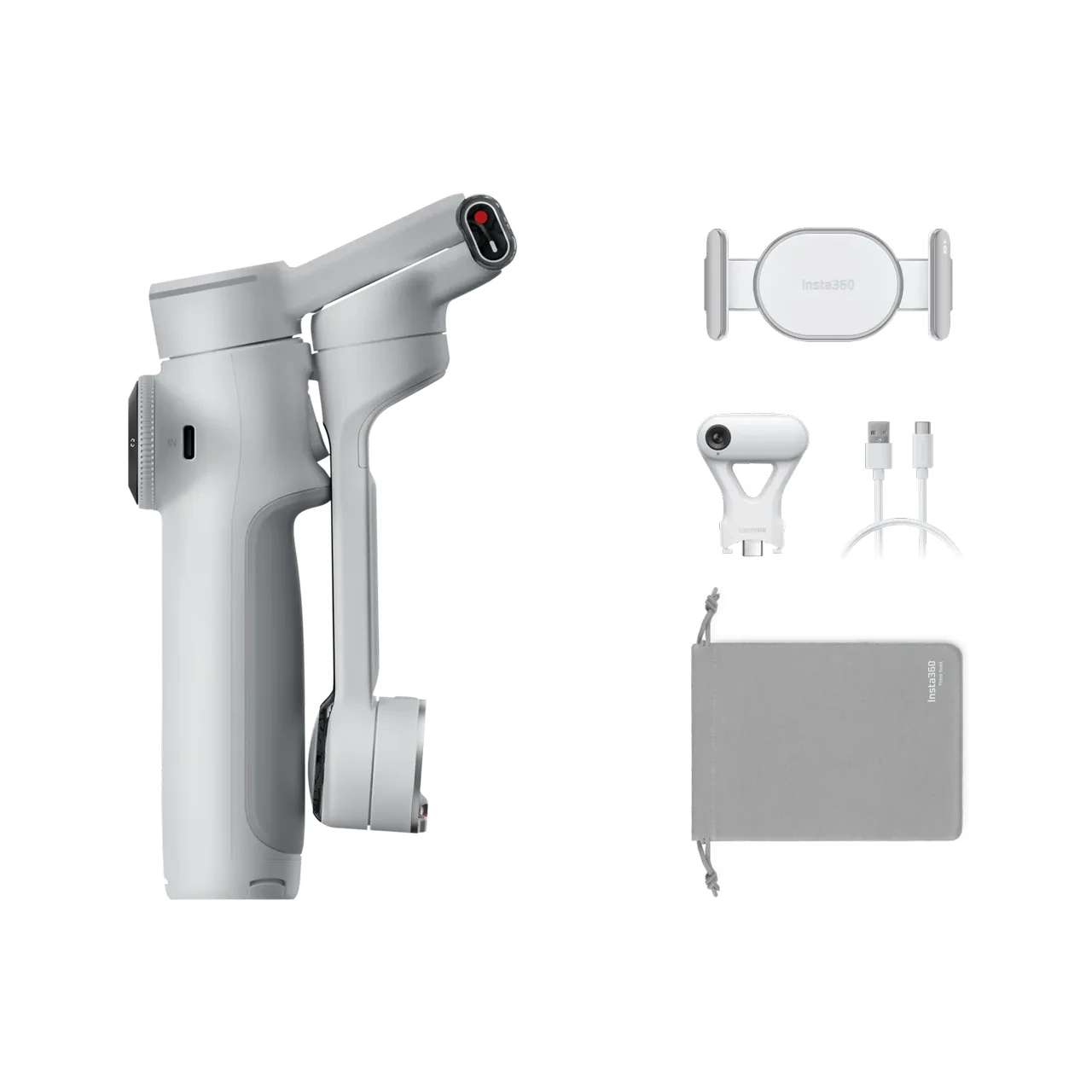
The reviewed Flow 2 Pro Standard Bundle includes the gimbal, phone clamp, charging cable and pouch. The AI Tracker Bundle adds the named module. The Creator Bundle’s Spotlight is a different accessory; a light’s presence is not evidence that an AI Tracker is supplied.
Insta360 Flow 2 Pro
Price range: KShs 33,500 through KShs 48,000
In stock
Match the tracking method to your phone and app before selecting a bundle. Standard equipment, an AI Tracker and a separate Spotlight are different package contents.
View product & options →Compare the actual Standard Bundle with the AI Tracker Bundle. Select the finish and inspect the description of that exact option. Current offers are shown in the live card and configuration pages.
If you are comparing another system, our Osmo Mobile 8P package guide explains its different combo choices. Accessory names and contents do not transfer between brands, even when the intended recording job is similar.
Rehearse the shot in the actual app
Before an important session, try the same orientation, camera, framing and walking area that you plan to use. Watch whether the subject stays in frame, then separately check the recording and audio. A moving gimbal head is not proof that the app saved a clip or used your intended microphone.
Leave the gimbal room to move, use a secure position and check the result after a short take. These are preparation steps, not a NextBuy performance test or a promise that tracking cannot be lost. Firmware, phone software and app updates can change available functions, so recheck the workflow after a meaningful update.
See setup and tracking in the manufacturer’s tutorial
Watch the official Insta360 Flow 2 Pro QuickStart Guide for setup, controls and app use. Follow it alongside the current tracking comparison, since capabilities can change after a tutorial was recorded.
Does three-axis stabilisation mean every app can track me?
No. Stabilisation and subject tracking are separate functions. Check the tracking route supported by the exact phone and app.
Is a Spotlight the same thing as the AI Tracker?
No. Confirm the named accessory in the package description; lighting and tracking are different jobs.
Does DockKit describe Android support?
No. Apple DockKit is an Apple feature. Check the current manufacturer information for your Android handset’s supported tracking routes.
Image: genuine existing NextBuy Flow 2 Pro media. Video: Insta360 Tutorials. No sourced demonstration is presented as a NextBuy test.