
Nintendo Switch 2 in Kenya: Which Old Games and Accessories Can You Keep?
Check the games, controllers, dock and storage you already own before budgeting for an upgrade.
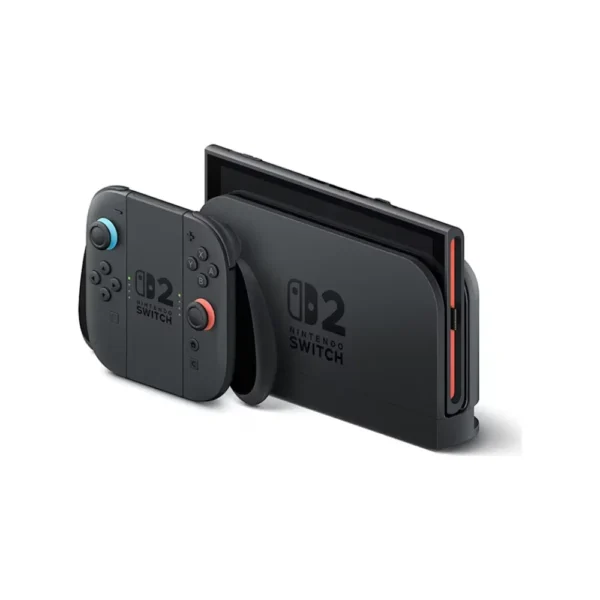
Start with what you already own
Moving from a Nintendo Switch to Switch 2 does not mean replacing every game and controller. It also does not mean that everything transfers unchanged. Separate four checks: the exact game, its controller requirements, the charging and TV equipment, and your accounts and saved progress.
For a Kenyan household upgrading an existing setup, that is a more useful budgeting exercise than buying another controller, memory card and dock automatically. Make a short list of the games people actually play and the accessories they use. Check that list before trading in or giving away the old system.
The decision in one sentence
Keep compatible items that still serve your games, use the new console’s proper TV equipment, and settle the data-transfer plan before disposing of the old console.
Check the exact game, not just the Switch name
Nintendo Switch 2 can play compatible physical and digital Nintendo Switch games as well as its own software. Nintendo also identifies exceptions and games with special requirements. Search the exact title in Nintendo’s current game-compatibility information; an old launch-period list may miss later changes.
Running the original game and receiving a newer edition’s improvements are separate questions. Some titles offer a free update, while others have a paid upgrade. Before paying again, establish what you already own, what still runs and what the extra purchase actually adds.
Check the way you own each title too: a physical card, a digital purchase and a supplied bundle download need different access checks. If you are buying a download code in Kenya, confirm its redemption conditions and compatibility with your Nintendo Account before payment. A console package name alone does not settle those conditions.
Special control features can be the reason to retain older hardware. For example, Nintendo explains that Joy-Con 2 lacks the original right Joy-Con’s IR Motion Camera, so certain older game functions need the original controller connected wirelessly. A game being supported is not always the same as every feature working with the new controller pair.
Keep a controller plan and a charging plan
| Item you own | Use with Switch 2 | Important limitation |
|---|---|---|
| Original Joy-Con | Wireless connection | They do not attach to or charge on the Switch 2 console. |
| Original Switch Pro Controller | Wireless connection | Check the game’s required controls; charging is possible by USB through the Switch 2 dock. |
| Original Switch dock | Not compatible | Use the Switch 2 dock for the new console. |
| Original Joy-Con grip or straps | Keep with original Joy-Con | They are not attachments for Joy-Con 2. |
Nintendo’s compatibility reference distinguishes wireless controller use from physical attachment. If you retain original Joy-Con, retain a compatible way to charge them, such as the older console or the appropriate charging accessory.
For local multiplayer, count the controllers required by your actual game and player count. Do not assume that one pair always equals two complete player setups. Equally, avoid buying a replacement pair merely because the console generation changed: identify what the existing controllers cannot do for your games first.
The TV setup needs Switch 2 equipment
The old dock is not a spare Switch 2 dock. Nintendo also distinguishes charging from TV-mode power: the original Switch AC adapter can charge Switch 2 directly, but cannot supply its TV-mode requirements. Nintendo recommends the Ultra High Speed HDMI cable supplied with Switch 2 rather than carrying over the old console’s supplied cable. See the official accessory table.
When opening the new package, identify the dock, adapter, USB-C power cable and HDMI cable before setting anything aside. Keeping these together makes later troubleshooting simpler. A spare cable that physically fits a socket is not proof that the complete TV setup meets the console’s requirements.
This is also a reason to inspect the selected package’s contents rather than treating a console-only second-hand offer and a complete retail pack as equivalent. Compare what you would actually receive and what you would still need to obtain.
Your old microSD card is not a game-library shortcut
The completed NextBuy Switch 2 listing has 256GB console storage and describes microSD Express expansion. Nintendo confirms that Switch 2 needs microSD Express for expanded game storage. An ordinary microSD card from the original Switch does not become compatible game storage when moved across.
Nintendo allows the old card to be used for viewing or importing captured screenshots and videos. That limited use should not be confused with loading games or carrying saved progress. Its card-compatibility explanation also says an internet system update is required the first time a microSD Express card is used.
If card labels are confusing, our microSD speed-class guide explains capacity, V30 and U3. Those markings are not substitutes for the Express requirement. Buy for the receiving device’s exact specification rather than choosing by GB alone.
Arrange the transfer before selling the old console
Follow Nintendo’s system-transfer instructions before initial setup or disposal. Nintendo offers local-communication and server-based routes, and the consequences for data on the source console differ. The server-upload route restores the source console to factory settings; some save data is also removed from the source during a local transfer.
Do not treat a transfer as a harmless trial. Read the deletion notices and check which route suits your situation before confirming it. Afterwards, verify the users, games and saved progress that matter to your household. Do not manually erase the old console first or assume inserting its memory card transfers the saves.
Allow for internet downloads as well as the transfer itself. A useful plan for an upgrade day is to have account access, both charged consoles where the chosen route needs them, a reliable connection and enough time to check the result before handing over the old hardware.
Check the completed Standard package
The Switch 2 Standard configuration is a concrete example: it includes the new console, Joy-Con 2 pair, dock, power equipment, grip, straps and HDMI cable, but no game. The populated NextBuy handheld schema identifies it as a Hybrid Console with a 256GB configuration. Package choice does not mean you need to rebuy every compatible item from the original system.
Nintendo Switch 2: current model offers
Package price range: Price range: KShs 75,500 through KShs 83,500
In stock · Availability varies by selected package.
The range covers the model’s listed packages; it is not the Standard package’s exact price. Open the selected configuration for its current offer and contents.
View product & options →Budget in four groups: the console package, any games you genuinely need, compatible expansion storage if necessary, and accessories your chosen games require. This avoids paying twice for items you can still use while leaving out an essential charging or game-access requirement.
Questions before upgrading
Can every original Switch game run exactly as before?
No blanket promise is appropriate. Check the exact title’s current compatibility information, required controllers and any special limitations.
Can I attach my old Joy-Con to Switch 2?
No. Original Joy-Con can connect wirelessly, but they do not attach to or charge on the Switch 2 console. Plan a compatible charging method.
Can the old microSD card transfer my games and saves?
Moving that card is not a system transfer. Switch 2 game-storage expansion requires microSD Express; follow Nintendo’s separate transfer instructions for users and saved data.
See the console modes and official references
Nintendo’s Switch 2 overview
Watch Nintendo’s official Switch 2 overview to see the hardware and play modes. Use the current game and accessory compatibility references above for the limitations that affect an existing collection.
Manufacturer photograph: Nintendo, reused from the existing NextBuy product media. This guide is based on documented compatibility and current catalogue checks; it does not claim a NextBuy hands-on migration test.